Send payloads to your AI agents or systems based on events in apps
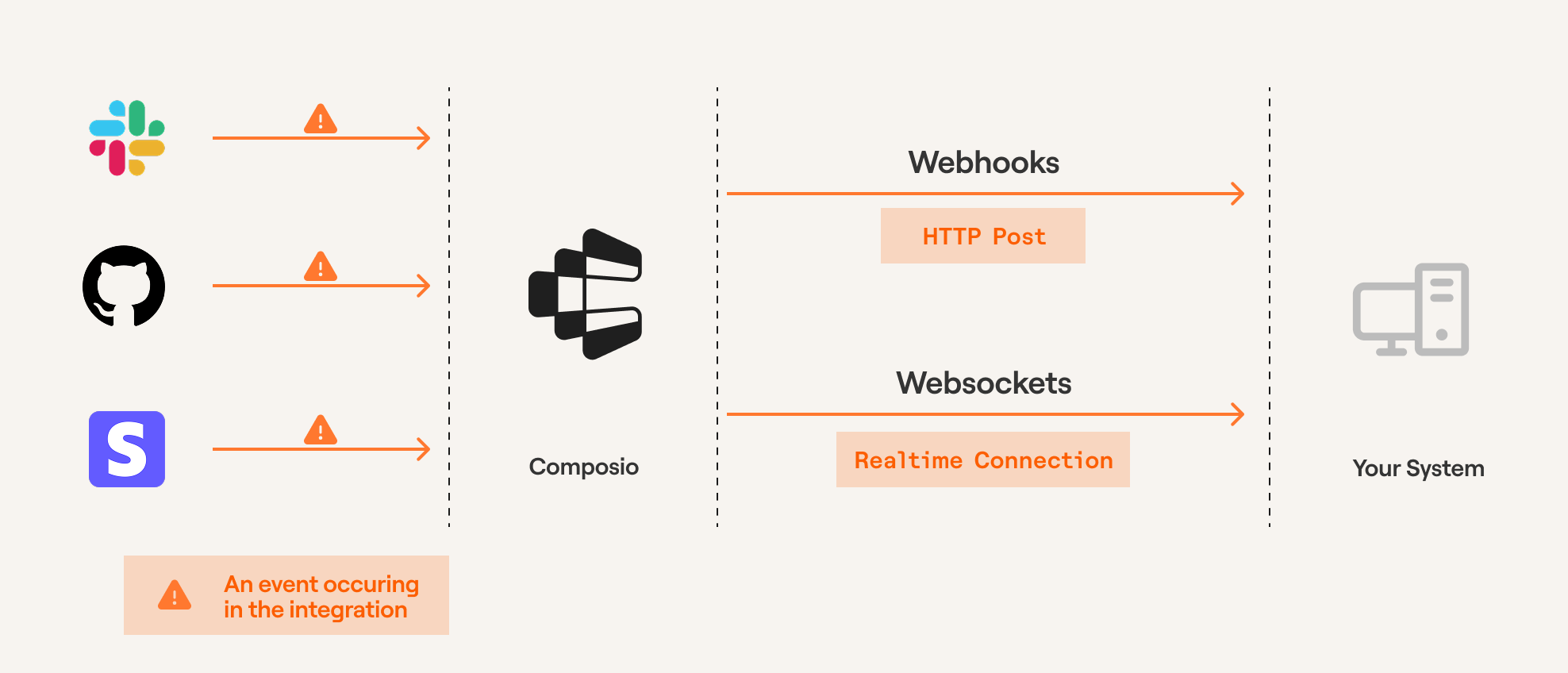
When events occur in connected apps (like new Slack messages or GitHub commits), triggers automatically send the event data to your application.
Each event is delivered as a structured payload to your webhook endpoint (via webhooks or WebSockets), enabling your applications or AI agents to respond proactively.
Triggers through Composio
Prerequisites
Before proceeding, ensure you've created an auth config and established a connection to an app (e.g., Slack, GitHub). Triggers are scoped to specific users - learn about User Management for guidance on structuring User IDs.
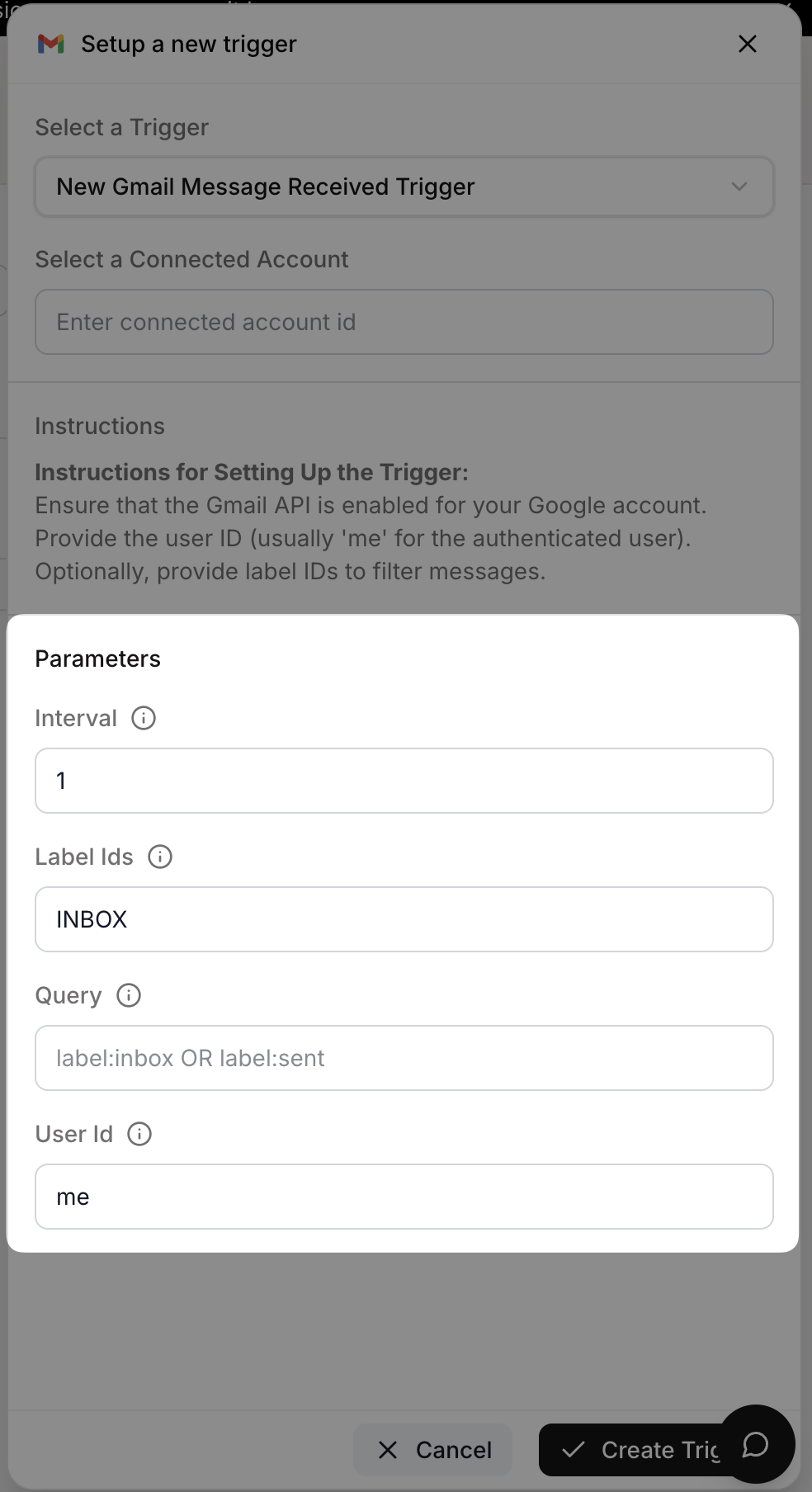
Create triggers programmatically by providing the trigger type and any required configuration. The trigger instance will be created using the toolkit version configured during Composio initialization (defaults to 'latest').
from composio import Composiocomposio = Composio(api_key="your-api-key")user_id = "user-id-123435"# Check what configuration is requiredtrigger_type = composio.triggers.get_type("GITHUB_COMMIT_EVENT")print(trigger_type.config)# Returns: {"properties": {...}, "required": ["owner", "repo"], ...}# Create trigger with the required configtrigger = composio.triggers.create( slug="GITHUB_COMMIT_EVENT", user_id=user_id, trigger_config={"owner": "your-repo-owner", "repo": "your-repo-name"},)print(f"Trigger created: {trigger.trigger_id}")
import { class Composio<TProvider extends BaseComposioProvider<unknown, unknown, unknown> = OpenAIProvider>
This is the core class for Composio.
It is used to initialize the Composio SDK and provide a global configuration.
Creates a new instance of the Composio SDK.
The constructor initializes the SDK with the provided configuration options,
sets up the API client, and initializes all core models (tools, toolkits, etc.).
@paramconfig - Configuration options for the Composio SDK@paramconfig.apiKey - The API key for authenticating with the Composio API@paramconfig.baseURL - The base URL for the Composio API (defaults to production URL)@paramconfig.allowTracking - Whether to allow anonymous usage analytics@paramconfig.provider - The provider to use for this Composio instance (defaults to OpenAIProvider)@example```typescript
// Initialize with default configuration
const composio = new Composio();
// Initialize with custom API key and base URL
const composio = new Composio({
apiKey: 'your-api-key',
baseURL: 'https://api.composio.dev'
});
// Initialize with custom provider
const composio = new Composio({
apiKey: 'your-api-key',
provider: new CustomProvider()
});
```
Composio({apiKey?: string | null | undefined
The API key for the Composio API.
@example'sk-1234567890'
apiKey: "your-api-key"});constconst userId: "user-id-123435"userId = 'user-id-123435';// Check what configuration is requiredconst
Retrieve a trigger type by its slug for the provided version of the app
Use the global toolkit versions param when initializing composio to pass a toolkitversion
@paramslug - The slug of the trigger type@returnsThe trigger type object
The `console` module provides a simple debugging console that is similar to the
JavaScript console mechanism provided by web browsers.
The module exports two specific components:
* A `Console` class with methods such as `console.log()`, `console.error()` and `console.warn()` that can be used to write to any Node.js stream.
* A global `console` instance configured to write to [`process.stdout`](https://nodejs.org/docs/latest-v24.x/api/process.html#processstdout) and
[`process.stderr`](https://nodejs.org/docs/latest-v24.x/api/process.html#processstderr). The global `console` can be used without importing the `node:console` module.
_**Warning**_: The global console object's methods are neither consistently
synchronous like the browser APIs they resemble, nor are they consistently
asynchronous like all other Node.js streams. See the [`note on process I/O`](https://nodejs.org/docs/latest-v24.x/api/process.html#a-note-on-process-io) for
more information.
Example using the global `console`:
```js
console.log('hello world');
// Prints: hello world, to stdout
console.log('hello %s', 'world');
// Prints: hello world, to stdout
console.error(new Error('Whoops, something bad happened'));
// Prints error message and stack trace to stderr:
// Error: Whoops, something bad happened
// at [eval]:5:15
// at Script.runInThisContext (node:vm:132:18)
// at Object.runInThisContext (node:vm:309:38)
// at node:internal/process/execution:77:19
// at [eval]-wrapper:6:22
// at evalScript (node:internal/process/execution:76:60)
// at node:internal/main/eval_string:23:3
const name = 'Will Robinson';
console.warn(`Danger ${name}! Danger!`);
// Prints: Danger Will Robinson! Danger!, to stderr
```
Example using the `Console` class:
```js
const out = getStreamSomehow();
const err = getStreamSomehow();
const myConsole = new console.Console(out, err);
myConsole.log('hello world');
// Prints: hello world, to out
myConsole.log('hello %s', 'world');
// Prints: hello world, to out
myConsole.error(new Error('Whoops, something bad happened'));
// Prints: [Error: Whoops, something bad happened], to err
const name = 'Will Robinson';
myConsole.warn(`Danger ${name}! Danger!`);
// Prints: Danger Will Robinson! Danger!, to err
```
Prints to `stdout` with newline. Multiple arguments can be passed, with the
first used as the primary message and all additional used as substitution
values similar to [`printf(3)`](http://man7.org/linux/man-pages/man3/printf.3.html)
(the arguments are all passed to [`util.format()`](https://nodejs.org/docs/latest-v24.x/api/util.html#utilformatformat-args)).
```js
const count = 5;
console.log('count: %d', count);
// Prints: count: 5, to stdout
console.log('count:', count);
// Prints: count: 5, to stdout
```
See [`util.format()`](https://nodejs.org/docs/latest-v24.x/api/util.html#utilformatformat-args) for more information.
Create a new trigger instance for a user
If the connected account id is not provided, the first connected account for the user and toolkit will be used
@paramuserId - The user id of the trigger instance@paramslug - The slug of the trigger instance@parambody - The parameters to create the trigger instance@returnsThe created trigger instance
The `console` module provides a simple debugging console that is similar to the
JavaScript console mechanism provided by web browsers.
The module exports two specific components:
* A `Console` class with methods such as `console.log()`, `console.error()` and `console.warn()` that can be used to write to any Node.js stream.
* A global `console` instance configured to write to [`process.stdout`](https://nodejs.org/docs/latest-v24.x/api/process.html#processstdout) and
[`process.stderr`](https://nodejs.org/docs/latest-v24.x/api/process.html#processstderr). The global `console` can be used without importing the `node:console` module.
_**Warning**_: The global console object's methods are neither consistently
synchronous like the browser APIs they resemble, nor are they consistently
asynchronous like all other Node.js streams. See the [`note on process I/O`](https://nodejs.org/docs/latest-v24.x/api/process.html#a-note-on-process-io) for
more information.
Example using the global `console`:
```js
console.log('hello world');
// Prints: hello world, to stdout
console.log('hello %s', 'world');
// Prints: hello world, to stdout
console.error(new Error('Whoops, something bad happened'));
// Prints error message and stack trace to stderr:
// Error: Whoops, something bad happened
// at [eval]:5:15
// at Script.runInThisContext (node:vm:132:18)
// at Object.runInThisContext (node:vm:309:38)
// at node:internal/process/execution:77:19
// at [eval]-wrapper:6:22
// at evalScript (node:internal/process/execution:76:60)
// at node:internal/main/eval_string:23:3
const name = 'Will Robinson';
console.warn(`Danger ${name}! Danger!`);
// Prints: Danger Will Robinson! Danger!, to stderr
```
Example using the `Console` class:
```js
const out = getStreamSomehow();
const err = getStreamSomehow();
const myConsole = new console.Console(out, err);
myConsole.log('hello world');
// Prints: hello world, to out
myConsole.log('hello %s', 'world');
// Prints: hello world, to out
myConsole.error(new Error('Whoops, something bad happened'));
// Prints: [Error: Whoops, something bad happened], to err
const name = 'Will Robinson';
myConsole.warn(`Danger ${name}! Danger!`);
// Prints: Danger Will Robinson! Danger!, to err
```
Prints to `stdout` with newline. Multiple arguments can be passed, with the
first used as the primary message and all additional used as substitution
values similar to [`printf(3)`](http://man7.org/linux/man-pages/man3/printf.3.html)
(the arguments are all passed to [`util.format()`](https://nodejs.org/docs/latest-v24.x/api/util.html#utilformatformat-args)).
```js
const count = 5;
console.log('count: %d', count);
// Prints: count: 5, to stdout
console.log('count:', count);
// Prints: count: 5, to stdout
```
See [`util.format()`](https://nodejs.org/docs/latest-v24.x/api/util.html#utilformatformat-args) for more information.
@sincev0.1.100
log(`Trigger created: ${
const trigger: { triggerId: string;}
trigger.triggerId: stringtriggerId}`);
To use a specific toolkit version when creating triggers, configure toolkitVersions during initialization. See Toolkit Versioning for more details.
The recommended way to subscribe to triggers is through webhooks. Configure your webhook URL in the Event & Trigger settings.
Use a publicly accessible URL where Composio can send event payloads. This endpoint should be able to process incoming POST requests containing the trigger data.
Local development: Use ngrok or webhook.site to expose your local server to the internet for testing.
Webhook payloads contain:
type: The trigger type identifier
data: The actual event data
timestamp: When the event occurred
log_id: Unique identifier for this event
Below are examples of webhook handlers for FastAPI and Next.js applications:
@app.post("/webhook")async def webhook_handler(request: Request): payload = await request.json() trigger_type = payload.get("type") event_data = payload.get("data", {}) if trigger_type == "github_star_added_event": repo_name = event_data.get("repository_name") starred_by = event_data.get("starred_by") print(f"Repository {repo_name} starred by {starred_by}") # Add your business logic here return {"status": "success", "message": "Webhook processed"}
The `console` module provides a simple debugging console that is similar to the
JavaScript console mechanism provided by web browsers.
The module exports two specific components:
* A `Console` class with methods such as `console.log()`, `console.error()` and `console.warn()` that can be used to write to any Node.js stream.
* A global `console` instance configured to write to [`process.stdout`](https://nodejs.org/docs/latest-v24.x/api/process.html#processstdout) and
[`process.stderr`](https://nodejs.org/docs/latest-v24.x/api/process.html#processstderr). The global `console` can be used without importing the `node:console` module.
_**Warning**_: The global console object's methods are neither consistently
synchronous like the browser APIs they resemble, nor are they consistently
asynchronous like all other Node.js streams. See the [`note on process I/O`](https://nodejs.org/docs/latest-v24.x/api/process.html#a-note-on-process-io) for
more information.
Example using the global `console`:
```js
console.log('hello world');
// Prints: hello world, to stdout
console.log('hello %s', 'world');
// Prints: hello world, to stdout
console.error(new Error('Whoops, something bad happened'));
// Prints error message and stack trace to stderr:
// Error: Whoops, something bad happened
// at [eval]:5:15
// at Script.runInThisContext (node:vm:132:18)
// at Object.runInThisContext (node:vm:309:38)
// at node:internal/process/execution:77:19
// at [eval]-wrapper:6:22
// at evalScript (node:internal/process/execution:76:60)
// at node:internal/main/eval_string:23:3
const name = 'Will Robinson';
console.warn(`Danger ${name}! Danger!`);
// Prints: Danger Will Robinson! Danger!, to stderr
```
Example using the `Console` class:
```js
const out = getStreamSomehow();
const err = getStreamSomehow();
const myConsole = new console.Console(out, err);
myConsole.log('hello world');
// Prints: hello world, to out
myConsole.log('hello %s', 'world');
// Prints: hello world, to out
myConsole.error(new Error('Whoops, something bad happened'));
// Prints: [Error: Whoops, something bad happened], to err
const name = 'Will Robinson';
myConsole.warn(`Danger ${name}! Danger!`);
// Prints: Danger Will Robinson! Danger!, to err
```
Prints to `stdout` with newline. Multiple arguments can be passed, with the
first used as the primary message and all additional used as substitution
values similar to [`printf(3)`](http://man7.org/linux/man-pages/man3/printf.3.html)
(the arguments are all passed to [`util.format()`](https://nodejs.org/docs/latest-v24.x/api/util.html#utilformatformat-args)).
```js
const count = 5;
console.log('count: %d', count);
// Prints: count: 5, to stdout
console.log('count:', count);
// Prints: count: 5, to stdout
```
See [`util.format()`](https://nodejs.org/docs/latest-v24.x/api/util.html#utilformatformat-args) for more information.
@sincev0.1.100
log(`Repository ${const event: TriggerEvent<GitHubStarEventData>event.TriggerEvent<GitHubStarEventData>.data: TriggerEventData<GitHubStarEventData>data.repository_name: stringrepository_name} starred by ${const event: TriggerEvent<GitHubStarEventData>event.TriggerEvent<GitHubStarEventData>.data: TriggerEventData<GitHubStarEventData>data.starred_by: stringstarred_by}`); // Add your business logic here }res: NextApiResponseres.
The `process.env` property returns an object containing the user environment.
See [`environ(7)`](http://man7.org/linux/man-pages/man7/environ.7.html).
An example of this object looks like:
```js
{
TERM: 'xterm-256color',
SHELL: '/usr/local/bin/bash',
USER: 'maciej',
PATH: '~/.bin/:/usr/bin:/bin:/usr/sbin:/sbin:/usr/local/bin',
PWD: '/Users/maciej',
EDITOR: 'vim',
SHLVL: '1',
HOME: '/Users/maciej',
LOGNAME: 'maciej',
_: '/usr/local/bin/node'
}
```
It is possible to modify this object, but such modifications will not be
reflected outside the Node.js process, or (unless explicitly requested)
to other `Worker` threads.
In other words, the following example would not work:
```bash
node -e 'process.env.foo = "bar"' && echo $foo
```
While the following will:
```js
import { env } from 'node:process';
env.foo = 'bar';
console.log(env.foo);
```
Assigning a property on `process.env` will implicitly convert the value
to a string. **This behavior is deprecated.** Future versions of Node.js may
throw an error when the value is not a string, number, or boolean.
```js
import { env } from 'node:process';
env.test = null;
console.log(env.test);
// => 'null'
env.test = undefined;
console.log(env.test);
// => 'undefined'
```
Use `delete` to delete a property from `process.env`.
```js
import { env } from 'node:process';
env.TEST = 1;
delete env.TEST;
console.log(env.TEST);
// => undefined
```
On Windows operating systems, environment variables are case-insensitive.
```js
import { env } from 'node:process';
env.TEST = 1;
console.log(env.test);
// => 1
```
Unless explicitly specified when creating a `Worker` instance,
each `Worker` thread has its own copy of `process.env`, based on its
parent thread's `process.env`, or whatever was specified as the `env` option
to the `Worker` constructor. Changes to `process.env` will not be visible
across `Worker` threads, and only the main thread can make changes that
are visible to the operating system or to native add-ons. On Windows, a copy of `process.env` on a `Worker` instance operates in a case-sensitive manner
unlike the main thread.
Error('Missing required webhook headers or secret'); } if (!const signature: stringsignature.String.startsWith(searchString: string, position?: number): boolean
Returns true if the sequence of elements of searchString converted to a String is the
same as the corresponding elements of this object (converted to a String) starting at
position. Otherwise returns false.
@paramstart The index to the beginning of the specified portion of stringObj.@paramend The index to the end of the specified portion of stringObj. The substring includes the characters up to, but not including, the character indicated by end.
If this value is not specified, the substring continues to the end of stringObj.
Creates and returns an `Hmac` object that uses the given `algorithm` and `key`.
Optional `options` argument controls stream behavior.
The `algorithm` is dependent on the available algorithms supported by the
version of OpenSSL on the platform. Examples are `'sha256'`, `'sha512'`, etc.
On recent releases of OpenSSL, `openssl list -digest-algorithms` will
display the available digest algorithms.
The `key` is the HMAC key used to generate the cryptographic HMAC hash. If it is
a `KeyObject`, its type must be `secret`. If it is a string, please consider `caveats when using strings as inputs to cryptographic APIs`. If it was
obtained from a cryptographically secure source of entropy, such as
{@link
randomBytes
}
or
{@link
generateKey
}
, its length should not
exceed the block size of `algorithm` (e.g., 512 bits for SHA-256).
Example: generating the sha256 HMAC of a file
```js
import {
createReadStream,
} from 'node:fs';
import { argv } from 'node:process';
const {
createHmac,
} = await import('node:crypto');
const filename = argv[2];
const hmac = createHmac('sha256', 'a secret');
const input = createReadStream(filename);
input.on('readable', () => {
// Only one element is going to be produced by the
// hash stream.
const data = input.read();
if (data)
hmac.update(data);
else {
console.log(`${hmac.digest('hex')} ${filename}`);
}
});
```
Updates the `Hmac` content with the given `data`, the encoding of which
is given in `inputEncoding`.
If `encoding` is not provided, and the `data` is a string, an
encoding of `'utf8'` is enforced. If `data` is a `Buffer`, `TypedArray`, or`DataView`, then `inputEncoding` is ignored.
This can be called many times with new data as it is streamed.
@sincev0.1.94@paraminputEncoding The `encoding` of the `data` string.
Calculates the HMAC digest of all of the data passed using `hmac.update()`.
If `encoding` is
provided a string is returned; otherwise a `Buffer` is returned;
The `Hmac` object can not be used again after `hmac.digest()` has been
called. Multiple calls to `hmac.digest()` will result in an error being thrown.
@sincev0.1.94@paramencoding The `encoding` of the return value.
digest('base64'); returnmodule "crypto"
The `node:crypto` module provides cryptographic functionality that includes a
set of wrappers for OpenSSL's hash, HMAC, cipher, decipher, sign, and verify
functions.
```js
const { createHmac } = await import('node:crypto');
const secret = 'abcdefg';
const hash = createHmac('sha256', secret)
.update('I love cupcakes')
.digest('hex');
console.log(hash);
// Prints:
// c0fa1bc00531bd78ef38c628449c5102aeabd49b5dc3a2a516ea6ea959d6658e
```
This function compares the underlying bytes that represent the given `ArrayBuffer`, `TypedArray`, or `DataView` instances using a constant-time
algorithm.
This function does not leak timing information that
would allow an attacker to guess one of the values. This is suitable for
comparing HMAC digests or secret values like authentication cookies or [capability urls](https://www.w3.org/TR/capability-urls/).
`a` and `b` must both be `Buffer`s, `TypedArray`s, or `DataView`s, and they
must have the same byte length. An error is thrown if `a` and `b` have
different byte lengths.
If at least one of `a` and `b` is a `TypedArray` with more than one byte per
entry, such as `Uint16Array`, the result will be computed using the platform
byte order.
**When both of the inputs are `Float32Array`s or `Float64Array`s, this function might return unexpected results due to IEEE 754**
**encoding of floating-point numbers. In particular, neither `x === y` nor `Object.is(x, y)` implies that the byte representations of two floating-point**
**numbers `x` and `y` are equal.**
Use of `crypto.timingSafeEqual` does not guarantee that the _surrounding_ code
is timing-safe. Care should be taken to ensure that the surrounding code does
not introduce timing vulnerabilities.
During development, you can subscribe to triggers directly through the SDK without setting up webhooks.
You can subscribe to multiple trigger events by configuring the filters. When you specify multiple filters, ALL of them must match for the trigger to be subscribed to.
from composio import Composio# Initialize Composio clientcomposio = Composio(api_key="your_api_key_here")# Subscribe to trigger eventssubscription = composio.triggers.subscribe()# Define event handler@subscription.handle(trigger_id="your_trigger_id")def handle_github_commit(data): print(f"New commit detected: {data}") # Add your custom logic here# listen for events on the triggersubscription.wait_forever()# Note: For production use, set up webhooks instead
import { class Composio<TProvider extends BaseComposioProvider<unknown, unknown, unknown> = OpenAIProvider>
This is the core class for Composio.
It is used to initialize the Composio SDK and provide a global configuration.
Creates a new instance of the Composio SDK.
The constructor initializes the SDK with the provided configuration options,
sets up the API client, and initializes all core models (tools, toolkits, etc.).
@paramconfig - Configuration options for the Composio SDK@paramconfig.apiKey - The API key for authenticating with the Composio API@paramconfig.baseURL - The base URL for the Composio API (defaults to production URL)@paramconfig.allowTracking - Whether to allow anonymous usage analytics@paramconfig.provider - The provider to use for this Composio instance (defaults to OpenAIProvider)@example```typescript
// Initialize with default configuration
const composio = new Composio();
// Initialize with custom API key and base URL
const composio = new Composio({
apiKey: 'your-api-key',
baseURL: 'https://api.composio.dev'
});
// Initialize with custom provider
const composio = new Composio({
apiKey: 'your-api-key',
provider: new CustomProvider()
});
```
Composio({ apiKey?: string | null | undefined
The API key for the Composio API.
@example'sk-1234567890'
apiKey: "your_api_key_here" });// Subscribe to trigger eventsconst composio: Composio<OpenAIProvider>composio.Composio<OpenAIProvider>.triggers: Triggers<OpenAIProvider>
@paramfn - The function to call when a trigger is received@paramfilters - The filters to apply to the triggers@example```ts
triggers.subscribe((data) => {
console.log(data);
}, );
```
The `console` module provides a simple debugging console that is similar to the
JavaScript console mechanism provided by web browsers.
The module exports two specific components:
* A `Console` class with methods such as `console.log()`, `console.error()` and `console.warn()` that can be used to write to any Node.js stream.
* A global `console` instance configured to write to [`process.stdout`](https://nodejs.org/docs/latest-v24.x/api/process.html#processstdout) and
[`process.stderr`](https://nodejs.org/docs/latest-v24.x/api/process.html#processstderr). The global `console` can be used without importing the `node:console` module.
_**Warning**_: The global console object's methods are neither consistently
synchronous like the browser APIs they resemble, nor are they consistently
asynchronous like all other Node.js streams. See the [`note on process I/O`](https://nodejs.org/docs/latest-v24.x/api/process.html#a-note-on-process-io) for
more information.
Example using the global `console`:
```js
console.log('hello world');
// Prints: hello world, to stdout
console.log('hello %s', 'world');
// Prints: hello world, to stdout
console.error(new Error('Whoops, something bad happened'));
// Prints error message and stack trace to stderr:
// Error: Whoops, something bad happened
// at [eval]:5:15
// at Script.runInThisContext (node:vm:132:18)
// at Object.runInThisContext (node:vm:309:38)
// at node:internal/process/execution:77:19
// at [eval]-wrapper:6:22
// at evalScript (node:internal/process/execution:76:60)
// at node:internal/main/eval_string:23:3
const name = 'Will Robinson';
console.warn(`Danger ${name}! Danger!`);
// Prints: Danger Will Robinson! Danger!, to stderr
```
Example using the `Console` class:
```js
const out = getStreamSomehow();
const err = getStreamSomehow();
const myConsole = new console.Console(out, err);
myConsole.log('hello world');
// Prints: hello world, to out
myConsole.log('hello %s', 'world');
// Prints: hello world, to out
myConsole.error(new Error('Whoops, something bad happened'));
// Prints: [Error: Whoops, something bad happened], to err
const name = 'Will Robinson';
myConsole.warn(`Danger ${name}! Danger!`);
// Prints: Danger Will Robinson! Danger!, to err
```
Prints to `stdout` with newline. Multiple arguments can be passed, with the
first used as the primary message and all additional used as substitution
values similar to [`printf(3)`](http://man7.org/linux/man-pages/man3/printf.3.html)
(the arguments are all passed to [`util.format()`](https://nodejs.org/docs/latest-v24.x/api/util.html#utilformatformat-args)).
```js
const count = 5;
console.log('count: %d', count);
// Prints: count: 5, to stdout
console.log('count:', count);
// Prints: count: 5, to stdout
```
See [`util.format()`](https://nodejs.org/docs/latest-v24.x/api/util.html#utilformatformat-args) for more information.
data); // Add your custom logic here }, { triggerId?: string | undefinedtriggerId: 'your_trigger_id' });// Note: For production use, set up webhooks instead
Retrieve a trigger type by its slug for the provided version of the app
Use the global toolkit versions param when initializing composio to pass a toolkitversion
@paramslug - The slug of the trigger type@returnsThe trigger type object
The `console` module provides a simple debugging console that is similar to the
JavaScript console mechanism provided by web browsers.
The module exports two specific components:
* A `Console` class with methods such as `console.log()`, `console.error()` and `console.warn()` that can be used to write to any Node.js stream.
* A global `console` instance configured to write to [`process.stdout`](https://nodejs.org/docs/latest-v24.x/api/process.html#processstdout) and
[`process.stderr`](https://nodejs.org/docs/latest-v24.x/api/process.html#processstderr). The global `console` can be used without importing the `node:console` module.
_**Warning**_: The global console object's methods are neither consistently
synchronous like the browser APIs they resemble, nor are they consistently
asynchronous like all other Node.js streams. See the [`note on process I/O`](https://nodejs.org/docs/latest-v24.x/api/process.html#a-note-on-process-io) for
more information.
Example using the global `console`:
```js
console.log('hello world');
// Prints: hello world, to stdout
console.log('hello %s', 'world');
// Prints: hello world, to stdout
console.error(new Error('Whoops, something bad happened'));
// Prints error message and stack trace to stderr:
// Error: Whoops, something bad happened
// at [eval]:5:15
// at Script.runInThisContext (node:vm:132:18)
// at Object.runInThisContext (node:vm:309:38)
// at node:internal/process/execution:77:19
// at [eval]-wrapper:6:22
// at evalScript (node:internal/process/execution:76:60)
// at node:internal/main/eval_string:23:3
const name = 'Will Robinson';
console.warn(`Danger ${name}! Danger!`);
// Prints: Danger Will Robinson! Danger!, to stderr
```
Example using the `Console` class:
```js
const out = getStreamSomehow();
const err = getStreamSomehow();
const myConsole = new console.Console(out, err);
myConsole.log('hello world');
// Prints: hello world, to out
myConsole.log('hello %s', 'world');
// Prints: hello world, to out
myConsole.error(new Error('Whoops, something bad happened'));
// Prints: [Error: Whoops, something bad happened], to err
const name = 'Will Robinson';
myConsole.warn(`Danger ${name}! Danger!`);
// Prints: Danger Will Robinson! Danger!, to err
```
Prints to `stdout` with newline. Multiple arguments can be passed, with the
first used as the primary message and all additional used as substitution
values similar to [`printf(3)`](http://man7.org/linux/man-pages/man3/printf.3.html)
(the arguments are all passed to [`util.format()`](https://nodejs.org/docs/latest-v24.x/api/util.html#utilformatformat-args)).
```js
const count = 5;
console.log('count: %d', count);
// Prints: count: 5, to stdout
console.log('count:', count);
// Prints: count: 5, to stdout
```
See [`util.format()`](https://nodejs.org/docs/latest-v24.x/api/util.html#utilformatformat-args) for more information.
The `console` module provides a simple debugging console that is similar to the
JavaScript console mechanism provided by web browsers.
The module exports two specific components:
* A `Console` class with methods such as `console.log()`, `console.error()` and `console.warn()` that can be used to write to any Node.js stream.
* A global `console` instance configured to write to [`process.stdout`](https://nodejs.org/docs/latest-v24.x/api/process.html#processstdout) and
[`process.stderr`](https://nodejs.org/docs/latest-v24.x/api/process.html#processstderr). The global `console` can be used without importing the `node:console` module.
_**Warning**_: The global console object's methods are neither consistently
synchronous like the browser APIs they resemble, nor are they consistently
asynchronous like all other Node.js streams. See the [`note on process I/O`](https://nodejs.org/docs/latest-v24.x/api/process.html#a-note-on-process-io) for
more information.
Example using the global `console`:
```js
console.log('hello world');
// Prints: hello world, to stdout
console.log('hello %s', 'world');
// Prints: hello world, to stdout
console.error(new Error('Whoops, something bad happened'));
// Prints error message and stack trace to stderr:
// Error: Whoops, something bad happened
// at [eval]:5:15
// at Script.runInThisContext (node:vm:132:18)
// at Object.runInThisContext (node:vm:309:38)
// at node:internal/process/execution:77:19
// at [eval]-wrapper:6:22
// at evalScript (node:internal/process/execution:76:60)
// at node:internal/main/eval_string:23:3
const name = 'Will Robinson';
console.warn(`Danger ${name}! Danger!`);
// Prints: Danger Will Robinson! Danger!, to stderr
```
Example using the `Console` class:
```js
const out = getStreamSomehow();
const err = getStreamSomehow();
const myConsole = new console.Console(out, err);
myConsole.log('hello world');
// Prints: hello world, to out
myConsole.log('hello %s', 'world');
// Prints: hello world, to out
myConsole.error(new Error('Whoops, something bad happened'));
// Prints: [Error: Whoops, something bad happened], to err
const name = 'Will Robinson';
myConsole.warn(`Danger ${name}! Danger!`);
// Prints: Danger Will Robinson! Danger!, to err
```
Prints to `stdout` with newline. Multiple arguments can be passed, with the
first used as the primary message and all additional used as substitution
values similar to [`printf(3)`](http://man7.org/linux/man-pages/man3/printf.3.html)
(the arguments are all passed to [`util.format()`](https://nodejs.org/docs/latest-v24.x/api/util.html#utilformatformat-args)).
```js
const count = 5;
console.log('count: %d', count);
// Prints: count: 5, to stdout
console.log('count:', count);
// Prints: count: 5, to stdout
```
See [`util.format()`](https://nodejs.org/docs/latest-v24.x/api/util.html#utilformatformat-args) for more information.